Follow the steps below to create a new classroom course in the system.
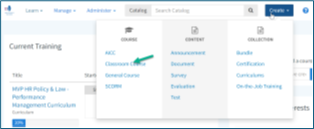
From the مرکزی صفحہ screen, hover over Create.
Under راستہ, choose Classroom Course.
Enter the required information to make the course easy to find:
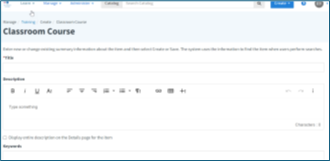
Title: Use a clear, concise course name. VDSS [Space] - [Space] [Course Number] [Colon] [Space] [Content Title]
Description: Summarize what the training covers. Optionally, display the full description on the course’s تفصیلات صفحہ۔
مطلوبہ الفاظ: Add relevant terms to improve searchability.
Scroll to the bottom right of the page.
کلک محفوظ کریں یا Create to finish the setup.
ٹپ
Clear titles, descriptions, and keywords help learners find the course quickly and understand its purpose.

یہ ویب سائٹ آپ کے براؤزنگ تجربے کو بہتر بنانے کے لیے کوکیز استعمال کرتی ہے۔ ہماری ویب سائٹ کے استعمال کو جاری رکھ کر، آپ ہماری کوکیز کے استعمال سے اتفاق کرتے ہیں۔ براہ کرم ہماری ویب پالیسی کا جائزہ لیں تاکہ ہم جو ڈیٹا جمع کرتے ہیں اس کے بارے میں معلومات حاصل کریں اور اس کی حفاظت کو کیسے یقینی بناتے ہیں۔