Follow these steps to get the Classroom Course Enrollment Summary from the VDSS External Domain.
Step 1: Go to the Reports Console
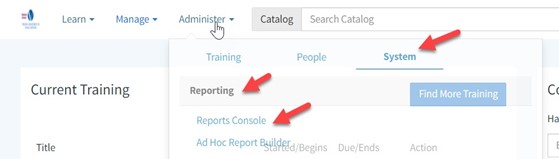
From the Home screen, hover over Administer.
Click System, then Reporting, and then Reports Console.
Step 2: Search for the Report
In the search box, type Progress.
From the results, select Classroom Course Enrollment Summary.
Step 3: Choose Your Organization
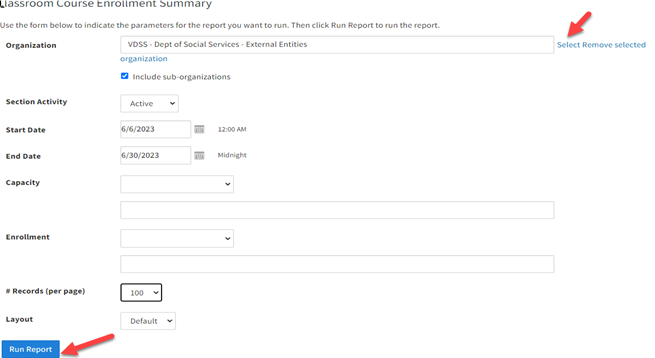
Click Select next to the Organization field.
In the pop-up box, search for and select Social Services External.
If you want to include sub-organizations, check the box for that option.
Step 4: Set Parameters and Run
Enter your report parameters.
Click Run Report.
یہ ویب سائٹ آپ کے براؤزنگ تجربے کو بہتر بنانے کے لیے کوکیز استعمال کرتی ہے۔ ہماری ویب سائٹ کے استعمال کو جاری رکھ کر، آپ ہماری کوکیز کے استعمال سے اتفاق کرتے ہیں۔ براہ کرم ہماری ویب پالیسی کا جائزہ لیں تاکہ ہم جو ڈیٹا جمع کرتے ہیں اس کے بارے میں معلومات حاصل کریں اور اس کی حفاظت کو کیسے یقینی بناتے ہیں۔
 / Virginia لرننگ سینٹر / VLC کے استعمال کے نکات / رپورٹنگ رول / انرولمنٹ رپورٹ کیسے بھریں





 میرا مقامی شعبہ تلاش کریں